Top 10 Caller Screen Ideas to Recognize Important Calls Faster
According to the 2024 State of the Call report by Hiya, published in Q1 2024, 92% of consumers believe unidentified calls are fraudulent, and nearly half of all unknown calls go unanswered as a result. That instinct to ignore has a serious downside: important calls get missed, too.
Imagine your phone buzzes on the desk while you're mid-task. You glance over, see what looks like just another notification, and let it ring out. Two minutes later, you realize it was your child's school, your doctor's office, or a call you'd been waiting on all week. The call looked just like every other one.
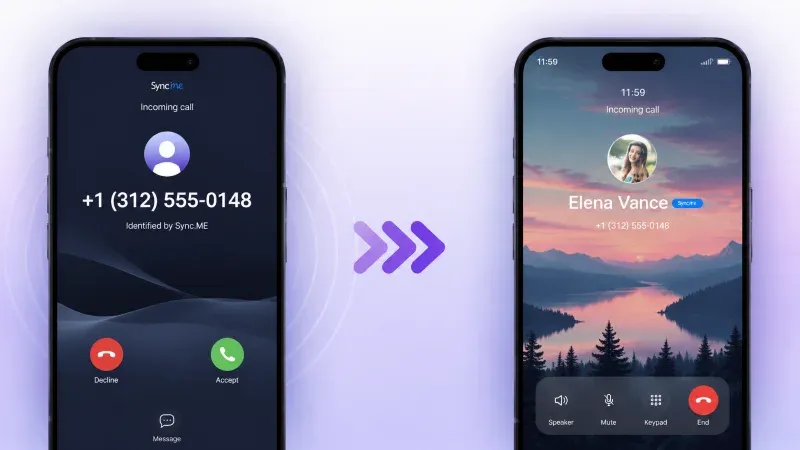
That's the core problem with a default caller screen. It treats every incoming call the same, same layout, same font, same generic silhouette where a face should be. When everything looks identical, your brain has no fast way to sort urgent from unimportant. You end up either answering everything or risk-ignoring the wrong call.
A well-designed custom call screen solves this by giving your most important contacts a distinct, immediately recognizable visual identity. This article covers 10 practical caller screen ideas that help you spot priority calls at a glance and stop missing the ones that matter.
How Can a Custom Call Screen Reduce Missed Important Calls?
A custom caller screen reduces missed important calls by making VIP contacts visually distinct from unknown numbers, spam, and low-priority callers. Instead of one uniform layout for every incoming call, you see a clear, immediate visual signal (a color, a face, a label) that tells you who's calling and how urgent it is before you've read a single word.
This matters most for three contact categories:
- Business contacts - clients, colleagues, or calls tied to time-sensitive decisions
- Family and close friends - people whose calls you always want to catch
- Emergency or essential services - doctors, schools, pharmacies, and care providers
Each of these groups has different urgency profiles. A calling screen that treats them all the same forces you to make a split-second judgment with no visual help. Customization removes that guesswork.

Top 10 Caller Screen Ideas for Recognizing Important Calls Faster
1. VIP Contact Highlight
Assign a bold visual frame or accent color to your most important contacts so they stand out the moment your screen lights up. A red border for immediate family, a blue one for key work contacts; the specific colors matter less than the consistency. Your brain learns the association fast, and recognition becomes automatic within days.
2. Full-Screen Contact Photo
Replace the small thumbnail with a full-screen photo for priority contacts. A large, familiar face is one of the fastest things the human brain can recognize, far faster than reading a name. This works especially well for family members and close friends whose photos you know immediately. Sync.me automatically pulls in social profile photos and keeps them current, so the face on your caller screen always matches who's actually calling.
3. Animated Caller Indicators
Use subtle animations to signal call priority without requiring you to read anything. A pulsing glow for VIP contacts, a static screen for unknowns, the motion itself draws your eye and tells you whether to pay attention. Keep animations understated: the goal is a fast signal, not a distraction.
4. Color-Coded Contact Categories
Assign a specific color scheme to each contact group: warm tones for family, cool blues for work, a distinct alert color for medical or emergency contacts. When your calling screen appears, the dominant color tells you the category before anything else registers. This is one of the simplest and most effective customizations available, and it scales easily as your contact list grows.
5. Quick Action Buttons on Screen
Add shortcut buttons directly to the incoming call interface: accept, decline, or send a pre-written response like "In a meeting, will call back in 30 min." This turns your caller screen from a passive display into an active tool. For business users who receive high call volumes, the ability to respond meaningfully with one tap, without answering, significantly reduces the friction of every interruption.
6. Caller Location or Contact Label
Display a label or location tag beneath the caller's name for context before you answer. "Doctor," "School," "Landlord," or a city name for an unfamiliar number gives you just enough context to make a faster, more informed decision. This is particularly useful for contacts you don't call often enough to recognize immediately, but whose calls you'd never want to miss.
7. Custom Ringtones Linked to the Caller Screen
Pair your visual custom call screen design with a distinct ringtone for each contact category. The combination of a visual cue and an audio cue creates two simultaneous recognition signals, which means you can identify an important call even when your phone is face down or across the room. A specific tone for family, a different one for work, and a sharp alert sound for any contact tagged as urgent.
8. Pattern or Icon-Based Recognition
Assign a small icon or symbol to recurring contacts as a secondary identifier alongside their name. A briefcase icon for business contacts, a heart for close family, and a medical cross for healthcare providers. Icons communicate categories instantly; they're processed visually, not linguistically, which makes them faster to read than text labels. This works well on calling screen layouts where space is limited or where names might be ambiguous.
9. Scheduled or Contextual Caller Screens
Configure your call screen to shift automatically depending on the time of day or your calendar status. During work hours, emphasize work contacts and mute visual alerts for personal calls. In the evening, flip the priority. Some apps allow location-based rules as well, for example, a different layout when you're at your home address versus a work location. This kind of contextual customization means your caller screen always reflects your current priorities without any manual switching.
10. Integrated Spam and Unknown Call Alerts
Make unknown numbers and potential spam visually unmistakable: a gray background, a warning icon, a "No ID" label in a distinct color. When spam is clearly separated from known contacts on your calling screen, you stop having to make a judgment call every time an unfamiliar number appears. You can confidently ignore what looks like spam and focus your attention on calls that display a clear, recognized identity.

How Do Tools Like Sync.me Enhance Caller Screen Features?
Sync.me enhances your caller screen by integrating real-time caller identification, spam alerts, and automatically updated contact photos into a single, cohesive calling experience. Instead of manually setting up each visual element, Sync.me does the heavy lifting: it links your contacts to their verified social media profiles, pulls in current photos, and flags unknown or spam numbers before you decide whether to answer.
The result is a custom call screen that stays accurate without constant maintenance. Contacts update automatically as people change their profile photos. Spam numbers are flagged in real time based on community reports and active detection. Caller info is displayed clearly so you always have context (name, photo, and call type) the moment your screen lights up.
For anyone who wants the benefits of a fully personalized calling screen without spending hours configuring every contact manually, Sync.me's approach is the most practical path. Explore Sync.me's caller screen and call themes features to see how it works in practice.
Small Screen Adjustments That Pay Off Every Time Your Phone Rings
The single strongest takeaway here: you don't need to overhaul your entire phone setup to stop missing important calls. A few targeted changes to your caller screen, distinct colors for VIP contacts, full-screen photos for family, a clear visual flag for unknown numbers, and create an immediate, tangible difference in how fast you recognize and respond to priority calls.
The average person makes or answers around 8 phone calls per day. Multiply that across a week, and the cumulative value of faster call recognition adds up quickly. Fewer hesitation moments, fewer missed calls from people who matter, and less mental load every time your phone rings.
A thoughtful custom call screen setup isn't a cosmetic upgrade. It's a small investment in one of the most-used interfaces on your phone, one that pays off every single time it appears.
Set up a personalized caller screen that highlights the calls you can't afford to miss.
Download Sync.me and customize your calling screen today
Frequently Asked Questions
How can a custom call screen help me identify important calls faster?
A custom call screen assigns distinct visual cues, colors, photos, and labels to different contacts and contact groups. When your phone rings, your brain processes these cues almost instantly, before you've consciously read any text. This dramatically reduces the time it takes to decide whether to answer, especially in high-distraction situations.
Can caller screens help me avoid spam calls?
Yes. A well-configured caller screen makes spam and unknown numbers visually distinct from saved contacts, typically through a different color scheme, a warning icon, or a "No ID" label. Apps like Sync.me go further by actively flagging numbers reported as spam by other users, so your screen alerts you before you answer.
What features should I look for in a caller screen app?
Prioritize contact photo integration, color-coding or category labeling, spam detection, and compatibility with your phone's operating system. A good calling screen app should also update contact information automatically rather than requiring manual maintenance. Check that the app has an active update history and clear privacy permissions before installing.
How do I assign colors or photos to specific contacts?
Most caller screen customization apps let you edit contact profiles directly to assign categories, colors, or photos. With Sync.me, photos are pulled automatically from linked social media profiles, removing the need to add them manually. For color coding, you typically assign contacts to groups (family, work, medical) and then set a color for each group in the app's settings.
Are animated caller screens distracting?
Only if the animations are excessive. Subtle motion, a soft pulse or a gentle glow around a VIP contact's photo is a useful attention signal, not a distraction. The key is using animation selectively: reserve it for high-priority contacts so the motion carries meaning. A screen that animates for every incoming call loses its signaling value quickly.
Related posts
Why Choosing the Right Call Theme Can Improve Your Phone Experience
Learn how a call theme enhances recognition, reduces errors, and personalizes your call screen. Choose a theme that fits your calling habits & style.
Caller Information: How to Find Caller Information by Phone Number
Learn how to find caller information by number using caller ID tools, reverse lookup services, and online databases to identify unknown callers.